Appearance
XCircleSegWidget
简介
通过可调节半径的圆形手绘工具,实现人工擦除或是涂抹,实现二维断层图像的手动分割。
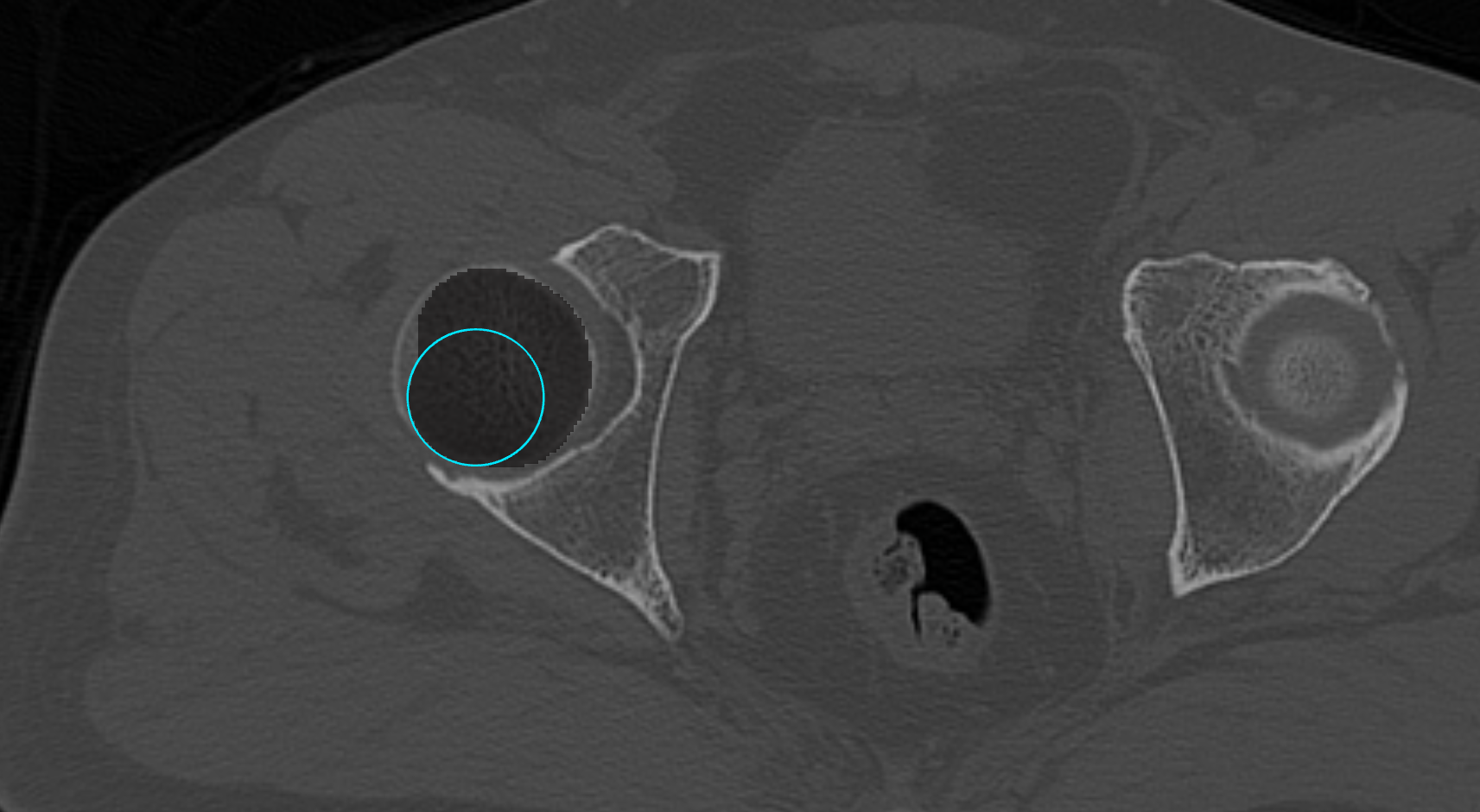
主要方法
其主要方法与 XCircleCenterWidget 的差不多,下面列举几个对其比较重要的函数。
- 获得圆的中心。
- 获得圆的半径。
- 获得默认的圆的半径。
- 设置默认的圆的半径。
- 设置圆的位置。
- 设置圆的位置和大小。
- 设置线的颜色。
- 重置。
- 结束交互的事件。
- 开始交互的事件。
- 实时交互的事件。
使用演示
vue
<template>
  <div class="circle-seg-example">
    <div class="toolbar">
      <button
        class="btn btn-image"
        :disabled="!!loading"
        @click="triggerImageInput"
      >
        {{ loading === "image" ? "加载中..." : "导入原始图像" }}
      </button>
      <input
        ref="imageInputEl"
        type="file"
        multiple
        accept=".dcm,.ima,.dicom,.mha,.mhd,.nrrd,.nii,.nii.gz"
        style="display: none"
        @change="onImageSelected"
      />

      <button
        class="btn btn-seg"
        :disabled="!!loading || !imageLoaded"
        @click="triggerSegInput"
      >
        {{ loading === "seg" ? "加载中..." : "导入分割图" }}
      </button>
      <input
        ref="segInputEl"
        type="file"
        accept=".nii,.nii.gz,.mha,.mhd,.nrrd,.dcm"
        style="display: none"
        @change="onSegSelected"
      />

      <button
        class="btn btn-new-seg"
        :disabled="!!loading || !imageLoaded"
        @click="createBlankSegmentation"
      >
        新建分割
      </button>

      <template v-if="imageLoaded">
        <span class="separator">|</span>

        <div class="orient-group">
          <button
            v-for="ori in ORIENTATIONS"
            :key="ori.value"
            class="btn btn-orient"
            :class="{ active: currentOrientation === ori.value }"
            @click="onOrientationChange(ori.value)"
          >
            {{ ori.label }}
          </button>
        </div>

        <span class="separator">|</span>

        <label class="slider-label">切片</label>
        <input
          type="range"
          class="slider"
          :min="sliceRange[0]"
          :max="sliceRange[1]"
          :step="sliceStep"
          v-model.number="slicePos"
          @input="onSliceChange"
        />
        <span class="val">{{ slicePos.toFixed(1) }}</span>

        <template v-if="segLoaded">
          <span class="separator">|</span>

          <label class="slider-label">透明度</label>
          <input
            type="range"
            class="slider"
            min="0"
            max="1"
            step="0.05"
            v-model.number="segOpacity"
            @input="onOpacityChange"
          />
          <span class="val">{{ segOpacity.toFixed(2) }}</span>

          <button class="btn btn-toggle" @click="toggleSegVisibility">
            {{ segVisible ? "隐藏分割" : "显示分割" }}
          </button>

          <button
            class="btn btn-export"
            :disabled="!!loading || exporting"
            @click="exportSegmentation"
          >
            {{ exporting ? "导出中..." : "导出 MHA" }}
          </button>

          <span class="separator">|</span>

          <button
            class="btn"
            :class="drawingActive ? 'btn-stop' : 'btn-draw'"
            @click="toggleDrawing"
          >
            {{ drawingActive ? "⬛ 停止涂抹" : "🖌️ 开始涂抹" }}
          </button>

          <div class="mode-group">
            <button
              class="btn btn-mode"
              :class="{ active: drawMode === 'erase' }"
              @click="drawMode = 'erase'"
            >
              擦除
            </button>
            <button
              class="btn btn-mode"
              :class="{ active: drawMode === 'paint' }"
              @click="drawMode = 'paint'"
            >
              涂标签
            </button>
          </div>

          <template v-if="drawMode === 'paint'">
            <label class="slider-label">标签</label>
            <input
              type="number"
              class="label-input"
              v-model.number="paintLabel"
              min="1"
              max="255"
            />
          </template>

          <span class="separator">|</span>

          <label class="slider-label">笔刷半径</label>
          <input
            type="range"
            class="slider"
            min="1"
            max="200"
            step="1"
            v-model.number="brushRadius"
            @input="onBrushRadiusChange"
          />
          <input
            type="number"
            class="label-input"
            v-model.number="brushRadius"
            min="1"
            @change="onBrushRadiusChange"
          />

          <span class="hint">
            左键按下并拖动可连续涂抹/擦除;拖圆周控制点可调整笔刷半径
          </span>

          <span v-if="lastResult" class="result-msg">{{ lastResult }}</span>
        </template>
      </template>
    </div>

    <div class="viewport">
      <XView2D
        ref="view2D"
        viewID="vtk-circle-seg-container"
        :background="[0.0, 0.0, 0.0, 1]"
      />
    </div>
  </div>
</template>

<script lang="ts" setup>
import { ref, onMounted, onBeforeUnmount } from "vue";
import XView2D from "@/components/XView2D.vue";
import { ReadDICOM } from "@/io/readDICOM";
import { ReadNifti } from "@/io/readNifti";
import { ReadImage } from "@/io/readImage";
import { XImageActor, type MPROrientation } from "@/props/XImageActor";
import vtkImageData from "@kitware/vtk.js/Common/DataModel/ImageData";
import vtkDataArray from "@kitware/vtk.js/Common/Core/DataArray";
import {
  XSegmentationActor,
  type LabelColorMap,
} from "@/props/XSegmentationActor";
import { XDataStore } from "@/data/XDataStore";
import vtkWidgetManager from "@kitware/vtk.js/Widgets/Core/WidgetManager";
// @ts-ignore
import XCircleSegWidget from "@/widgets/XCircleSegWidget/index.js";
import { applyCircleMask } from "@/utils/circleSegUtils";
import { writeImage, setPipelinesBaseUrl } from "@itk-wasm/image-io";
import { convertVtkToItkImage } from "@kitware/vtk.js/Common/DataModel/ITKHelper";

const IMAGE_NAME = "circle-seg-image";
const SEG_NAME = "circle-seg-segmentation";

const ORIENTATIONS: { value: MPROrientation; label: string }[] = [
  { value: "axial", label: "轴位" },
  { value: "coronal", label: "冠状位" },
  { value: "sagittal", label: "矢状位" },
];

const AXIS_IDX: Record<MPROrientation, [number, number, number]> = {
  axial: [4, 5, 2],
  coronal: [2, 3, 1],
  sagittal: [0, 1, 0],
};

const NORMAL_AXIS: Record<MPROrientation, 0 | 1 | 2> = {
  axial: 2,
  coronal: 1,
  sagittal: 0,
};

const view2D = ref<InstanceType<typeof XView2D> | null>(null);
const imageInputEl = ref<HTMLInputElement | null>(null);
const segInputEl = ref<HTMLInputElement | null>(null);

const loading = ref<false | "image" | "seg">(false);
const imageLoaded = ref(false);
const segLoaded = ref(false);
const segVisible = ref(true);
const currentOrientation = ref<MPROrientation>("axial");

const sliceRange = ref<[number, number]>([0, 1]);
const sliceStep = ref(1);
const slicePos = ref(0);
const segOpacity = ref(0.6);

const drawingActive = ref(false);
const drawMode = ref<"erase" | "paint">("paint");
const paintLabel = ref(1);
const brushRadius = ref(15);
const lastResult = ref("");
const exporting = ref(false);

let imageActor: XImageActor | null = null;
let segActor: XSegmentationActor | null = null;
let cachedImageData: any = null;
let cachedSegData: any = null;

let widgetManager: ReturnType<typeof vtkWidgetManager.newInstance> | null =
  null;
let circleWidget: any = null;
let circleWidgetView: any = null;
let onInteractionSub: { unsubscribe: () => void } | null = null;
let onEndInteractionSub: { unsubscribe: () => void } | null = null;
let slicePlaneSubscription: { unsubscribe: () => void } | null = null;
let nativeWheelListener: ((e: WheelEvent) => void) | null = null;
let brushedInCurrentStroke = false;

const ORIENTATION_NORMALS: Record<MPROrientation, [number, number, number]> = {
  axial: [0, 0, 1],
  coronal: [0, 1, 0],
  sagittal: [1, 0, 0],
};

function updateWidgetPlane() {
  if (!circleWidget) return;
  const manipulator = circleWidget.getManipulator?.();
  if (!manipulator) return;

  const axis = NORMAL_AXIS[currentOrientation.value];
  let worldPos = slicePos.value;
  if (imageActor) {
    const sp = imageActor.getSlicePlane?.();
    if (sp) {
      worldPos = (sp.getOrigin() as number[])[axis];
    }
  }

  const origin: [number, number, number] = [0, 0, 0];
  origin[axis] = worldPos;

  // Use userOrigin/userNormal (highest priority) so they override
  // useCameraFocalPoint/useCameraNormal set in the manipulator initializer.
  // The camera focal point is fixed at image-load time and never moves with
  // the slice, so widgetOrigin alone would be silently ignored.
  manipulator.setUserOrigin(origin);
  manipulator.setUserNormal(ORIENTATION_NORMALS[currentOrientation.value]);
}

function setupSlicePlaneObserver() {
  slicePlaneSubscription?.unsubscribe();
  slicePlaneSubscription = null;
  const sp = imageActor?.getSlicePlane?.();
  if (!sp) return;
  slicePlaneSubscription = sp.onModified(() => {
    const axis = NORMAL_AXIS[currentOrientation.value];
    const newPos = (sp.getOrigin() as number[])[axis];
    slicePos.value = newPos;
    if (drawingActive.value) {
      updateWidgetPlane();
    }
  });
}

function buildDemoColorMap(): LabelColorMap {
  const map: LabelColorMap = new Map();
  map.set(0, [0, 0, 0, 0]);
  map.set(1, [255, 80, 80, 220]);
  map.set(2, [80, 255, 80, 220]);
  map.set(3, [80, 130, 255, 220]);
  map.set(4, [255, 230, 50, 220]);
  return map;
}

function applyBrushFromWidget() {
  if (!cachedSegData || !circleWidgetView) return;

  const center: [number, number, number] | null =
    circleWidgetView.getCenterOrigin?.() ?? circleWidget.getCenterOrigin?.();
  const perimeter: [number, number, number] | null =
    circleWidgetView.getPerimeterOrigin?.() ??
    circleWidget.getPerimeterOrigin?.();
  if (!center || !perimeter) return;

  applyCircleMask(
    cachedSegData,
    center,
    perimeter,
    currentOrientation.value,
    drawMode.value,
    paintLabel.value,
    null,
  );

  segActor?.getMapper()?.modified?.();
  view2D.value?.renderAtOnce();
}

function createInitialBrushCircle() {
  if (!circleWidget || !cachedImageData) return;
  const bounds = cachedImageData.getBounds() as number[];
  const center: [number, number, number] = [0, 0, 0];

  if (currentOrientation.value === "axial") {
    center[0] = (bounds[0] + bounds[1]) / 2;
    center[1] = (bounds[2] + bounds[3]) / 2;
    center[2] = slicePos.value;
  } else if (currentOrientation.value === "coronal") {
    center[0] = (bounds[0] + bounds[1]) / 2;
    center[1] = slicePos.value;
    center[2] = (bounds[4] + bounds[5]) / 2;
  } else {
    center[0] = slicePos.value;
    center[1] = (bounds[2] + bounds[3]) / 2;
    center[2] = (bounds[4] + bounds[5]) / 2;
  }

  const radius = brushRadius.value;
  circleWidget.setCircle?.(center, radius);
}

onMounted(() => {
  if (!view2D.value) return;
  const renderer = view2D.value.getRenderer();

  widgetManager = vtkWidgetManager.newInstance();
  widgetManager.setRenderer(renderer);

  circleWidget = XCircleSegWidget.newInstance({
    handleScale: 3,
    lineThickness: 2,
    defaultRadius: 15,
  });
  // 双保险:确保该示例始终运行在分割刷子模式(固定半径跟随)
  circleWidget.setSegBrushMode?.(true);
});

onBeforeUnmount(() => {
  if (drawingActive.value) stopDrawing();
  slicePlaneSubscription?.unsubscribe();
  slicePlaneSubscription = null;
  widgetManager?.delete?.();
  circleWidget = null;
  widgetManager = null;
});

function triggerImageInput() {
  imageInputEl.value?.click();
}

function triggerSegInput() {
  segInputEl.value?.click();
}

async function onImageSelected(event: Event) {
  const input = event.target as HTMLInputElement;
  if (!input.files?.length) return;
  loading.value = "image";
  try {
    const files = Array.from(input.files);
    let imageData;

    if (files.length > 1 || files[0].name.toLowerCase().endsWith(".dcm")) {
      const result = await ReadDICOM.read(files);
      imageData = result.imageData;
    } else if (
      files[0].name.endsWith(".nii") ||
      files[0].name.endsWith(".nii.gz")
    ) {
      const result = await ReadNifti.read(files[0]);
      imageData = result.imageData;
    } else {
      const result = await ReadImage.read(files[0]);
      imageData = result.imageData;
    }

    XDataStore.getInstance().addImageData(IMAGE_NAME).setImageData(imageData);
    cachedImageData = imageData;

    if (imageActor) {
      slicePlaneSubscription?.unsubscribe();
      slicePlaneSubscription = null;
      view2D.value?.removeImageActor(imageActor);
      imageActor = null;
    }

    if (segActor) {
      view2D.value?.removeSegmentationActor(segActor);
      segActor = null;
      segLoaded.value = false;
      cachedSegData = null;
    }

    currentOrientation.value = "axial";
    imageActor = view2D.value?.addImage(IMAGE_NAME, "axial") ?? null;
    if (!imageActor) return;

    setupSlicePlaneObserver();

    // Override VTK's default 1 mm/click slice push with a voxel-spacing step
    // so non-drawing and drawing scroll stay on the same positional grid.
    view2D.value?.setSliceScrollCallback((dir: 1 | -1) => {
      const newPos = Math.max(
        sliceRange.value[0],
        Math.min(sliceRange.value[1], slicePos.value + dir * sliceStep.value),
      );
      if (newPos === slicePos.value) return;
      slicePos.value = newPos;
      view2D.value?.setSlicePosition(newPos);
    });

    const bounds = imageData.getBounds();
    const spacing = imageData.getSpacing();
    sliceRange.value = [bounds[4], bounds[5]];
    sliceStep.value = spacing[2] > 0 ? spacing[2] : 1;
    slicePos.value = (bounds[4] + bounds[5]) / 2;
    imageLoaded.value = true;
  } catch (e) {
    console.error("原始图像读取失败", e);
    alert("原始图像读取失败,请检查文件。");
  } finally {
    loading.value = false;
    input.value = "";
  }
}

async function onSegSelected(event: Event) {
  const input = event.target as HTMLInputElement;
  if (!input.files?.length) return;
  loading.value = "seg";
  try {
    const file = input.files[0];
    let segImageData;
    if (file.name.endsWith(".nii") || file.name.endsWith(".nii.gz")) {
      const result = await ReadNifti.read(file);
      segImageData = result.imageData;
    } else {
      const result = await ReadImage.read(file);
      segImageData = result.imageData;
    }

    XDataStore.getInstance().addImageData(SEG_NAME).setImageData(segImageData);
    cachedSegData = segImageData;

    if (segActor) {
      view2D.value?.removeSegmentationActor(segActor);
      segActor = null;
    }

    segActor =
      view2D.value?.addSegmentation(
        SEG_NAME,
        "axial",
        IMAGE_NAME,
        segOpacity.value,
        buildDemoColorMap(),
      ) ?? null;

    segLoaded.value = true;
    segVisible.value = true;
    view2D.value?.renderAtOnce();
  } catch (e) {
    console.error("分割图读取失败", e);
    alert("分割图读取失败,请检查文件格式。");
  } finally {
    loading.value = false;
    input.value = "";
  }
}

function createBlankSegmentation() {
  if (!cachedImageData) return;
  if (drawingActive.value) stopDrawing();

  const dims = cachedImageData.getDimensions() as number[];
  const numVoxels = dims[0] * dims[1] * dims[2];

  const blankScalars = vtkDataArray.newInstance({
    name: "Scalars",
    dataType: "Uint8Array",
    numberOfComponents: 1,
    values: new Uint8Array(numVoxels),
  });

  const segImageData = vtkImageData.newInstance();
  segImageData.setOrigin(cachedImageData.getOrigin());
  segImageData.setSpacing(cachedImageData.getSpacing());
  segImageData.setDirection(cachedImageData.getDirection());
  segImageData.setDimensions(dims);
  segImageData.getPointData().setScalars(blankScalars);

  XDataStore.getInstance().addImageData(SEG_NAME).setImageData(segImageData);
  cachedSegData = segImageData;

  if (segActor) {
    view2D.value?.removeSegmentationActor(segActor);
    segActor = null;
  }

  segActor =
    view2D.value?.addSegmentation(
      SEG_NAME,
      currentOrientation.value,
      IMAGE_NAME,
      segOpacity.value,
      buildDemoColorMap(),
    ) ?? null;

  segLoaded.value = true;
  segVisible.value = true;
  view2D.value?.renderAtOnce();
}

function onOrientationChange(orientation: MPROrientation) {
  if (!cachedImageData) return;
  if (drawingActive.value) stopDrawing();
  currentOrientation.value = orientation;
  view2D.value?.switchOrientation(orientation);

  const bounds = cachedImageData.getBounds() as number[];
  const spacing = cachedImageData.getSpacing() as number[];
  const [minIdx, maxIdx, spIdx] = AXIS_IDX[orientation];
  sliceRange.value = [bounds[minIdx], bounds[maxIdx]];
  sliceStep.value = spacing[spIdx] > 0 ? spacing[spIdx] : 1;
  slicePos.value = (bounds[minIdx] + bounds[maxIdx]) / 2;
  view2D.value?.setSlicePosition(slicePos.value);
  updateWidgetPlane();
}

function onSliceChange() {
  view2D.value?.setSlicePosition(slicePos.value);
  updateWidgetPlane();
}

function onBrushRadiusChange() {
  if (!circleWidget) return;
  const r = Math.max(1, brushRadius.value);
  brushRadius.value = r;
  circleWidget.setDefaultRadius?.(r);
  if (drawingActive.value) {
    const center = circleWidget.getCenterOrigin?.() as
      | [number, number, number]
      | null;
    if (center) {
      circleWidget.setCircle?.(center, r);
      view2D.value?.renderAtOnce();
    }
  }
}

function onOpacityChange() {
  segActor?.setOpacity(segOpacity.value);
  view2D.value?.renderAtOnce();
}

function toggleSegVisibility() {
  segVisible.value = !segVisible.value;
  segActor?.setVisibility(segVisible.value);
  view2D.value?.renderAtOnce();
}

function toggleDrawing() {
  if (drawingActive.value) {
    stopDrawing();
  } else {
    startDrawing();
  }
}

function startDrawing() {
  if (!widgetManager || !circleWidget || !segLoaded.value) return;

  circleWidgetView = widgetManager.addWidget(circleWidget);
  updateWidgetPlane();
  createInitialBrushCircle();
  brushedInCurrentStroke = false;

  // Native wheel listener: behavior returns EVENT_ABORT so VTK's internal
  // slice mechanism never fires. We drive the slice manually here so that
  // setSlicePosition → slicePlane.setOrigin → slicePlane.onModified →
  // updateWidgetPlane() keeps the widget on the correct slice.
  const viewportEl = document.getElementById("vtk-circle-seg-container");
  if (viewportEl) {
    nativeWheelListener = (e: WheelEvent) => {
      e.preventDefault();
      const dir = e.deltaY > 0 ? -1 : 1; // deltaY>0 = scroll down = previous slice
      const step = sliceStep.value;
      const newPos = Math.max(
        sliceRange.value[0],
        Math.min(sliceRange.value[1], slicePos.value + dir * step),
      );
      if (newPos === slicePos.value) return;
      slicePos.value = newPos;
      view2D.value?.setSlicePosition(newPos);
      // setSlicePosition → slicePlane.setOrigin → slicePlane.onModified → updateWidgetPlane
    };
    viewportEl.addEventListener("wheel", nativeWheelListener, {
      passive: false,
    });
  }

  onInteractionSub = circleWidgetView.onInteractionEvent(() => {
    brushedInCurrentStroke = true;
    applyBrushFromWidget();
  });

  onEndInteractionSub = circleWidgetView.onEndInteractionEvent(() => {
    const radius =
      circleWidgetView.getRadius?.() ?? circleWidget.getRadius?.() ?? 0;
    // Keep the slider in sync when the user drags the perimeter handle
    brushRadius.value = Math.round(radius * 10) / 10;
    const op =
      drawMode.value === "erase" ? "擦除" : `涂标签 ${paintLabel.value}`;
    lastResult.value = brushedInCurrentStroke
      ? `✓ 连续${op}完成,当前半径 ${radius.toFixed(2)}`
      : `提示:按住左键并移动才会${op}`;
    brushedInCurrentStroke = false;
  });

  widgetManager.grabFocus(circleWidget);
  view2D.value?.renderAtOnce();
  drawingActive.value = true;
  lastResult.value = "";
}

async function exportSegmentation() {
  if (!cachedSegData) return;
  exporting.value = true;
  try {
    setPipelinesBaseUrl("/itk-image-io-pipelines");
    const itkImage = convertVtkToItkImage(cachedSegData);
    // castImage (called internally when componentType is specified) does
    // Array.from(image.metadata), which crashes if metadata is undefined.
    // convertVtkToItkImage does not set metadata, so we ensure it here.
    if (!(itkImage.metadata instanceof Map)) {
      itkImage.metadata = new Map();
    }
    const result = await writeImage(itkImage, "segmentation.mha", {
      componentType: "uint8",
      useCompression: true,
    });
    const blob = new Blob([new Uint8Array(result.serializedImage.data)], {
      type: "application/octet-stream",
    });
    const url = URL.createObjectURL(blob);
    const a = document.createElement("a");
    a.href = url;
    a.download = "segmentation.mha";
    document.body.appendChild(a);
    a.click();
    document.body.removeChild(a);
    URL.revokeObjectURL(url);
  } catch (e) {
    console.error("导出分割图像失败", e);
    alert("导出失败,请查看控制台日志。");
  } finally {
    exporting.value = false;
  }
}

function stopDrawing() {
  if (!widgetManager) return;

  onInteractionSub?.unsubscribe?.();
  onEndInteractionSub?.unsubscribe?.();
  onInteractionSub = null;
  onEndInteractionSub = null;

  if (nativeWheelListener) {
    const viewportEl = document.getElementById("vtk-circle-seg-container");
    viewportEl?.removeEventListener("wheel", nativeWheelListener);
    nativeWheelListener = null;
  }

  // Restore camera-driven plane behaviour for non-segBrushMode usage
  const manipulator = circleWidget?.getManipulator?.();
  if (manipulator) {
    manipulator.setUserOrigin(null);
    manipulator.setUserNormal(null);
  }

  widgetManager.releaseFocus();
  circleWidget?.reset?.();
  if (circleWidget) widgetManager.removeWidget(circleWidget);
  circleWidgetView = null;
  drawingActive.value = false;

  // Force a final render so the painted segmentation overlay stays visible
  // after the widget circle is removed from the scene.
  if (cachedSegData) {
    (cachedSegData as any).modified();
    segActor?.getMapper()?.modified?.();
  }
  view2D.value?.renderAtOnce();
}
</script>

<style scoped>
.circle-seg-example {
  display: flex;
  flex-direction: column;
  width: 100vw;
  height: calc(100vh - 150px);
  overflow: hidden;
}

.toolbar {
  display: flex;
  align-items: center;
  gap: 8px;
  padding: 6px 12px;
  background: #1a1a1a;
  flex-shrink: 0;
  flex-wrap: wrap;
}

.btn {
  padding: 4px 14px;
  color: #fff;
  border: none;
  border-radius: 4px;
  cursor: pointer;
  font-size: 13px;
}

.btn:disabled {
  opacity: 0.5;
  cursor: not-allowed;
}

.btn-image {
  background: #2a6e3f;
}

.btn-image:hover:not(:disabled) {
  background: #3a8e4f;
}

.btn-seg {
  background: #1a4f8a;
}

.btn-seg:hover:not(:disabled) {
  background: #2a6faa;
}

.btn-new-seg {
  background: #4a2a7a;
}

.btn-new-seg:hover:not(:disabled) {
  background: #6a4a9a;
}

.btn-toggle {
  background: #555;
}

.btn-toggle:hover {
  background: #777;
}

.btn-export {
  background: #4a6a2a;
}

.btn-export:hover:not(:disabled) {
  background: #6a8a4a;
}

.btn-draw {
  background: #7a4a1a;
}

.btn-draw:hover {
  background: #9a6a3a;
}

.btn-stop {
  background: #7a1a1a;
}

.btn-stop:hover {
  background: #9a3a3a;
}

.orient-group,
.mode-group {
  display: flex;
  gap: 4px;
}

.btn-orient,
.btn-mode {
  background: #444;
}

.btn-orient:hover:not(:disabled),
.btn-mode:hover:not(:disabled) {
  background: #666;
}

.btn-orient.active,
.btn-mode.active {
  background: #2a7a4e;
}

.separator {
  color: #666;
  padding: 0 2px;
}

.slider-label {
  color: #ccc;
  font-size: 12px;
  white-space: nowrap;
}

.slider {
  width: 120px;
  accent-color: #42b883;
}

.val {
  color: #aaa;
  font-size: 12px;
  min-width: 40px;
}

.label-input {
  width: 56px;
  background: #333;
  color: #fff;
  border: 1px solid #555;
  border-radius: 4px;
  padding: 2px 6px;
  font-size: 13px;
}

.hint {
  color: #42b883;
  font-size: 12px;
}

.result-msg {
  color: #f0c040;
  font-size: 12px;
}

.viewport {
  flex: 1;
  overflow: hidden;
  position: relative;
}
</style>