Appearance
XPolygonSegWidget
简介
通过绘制多边形,来进行手动分割。主要是在结束绘制后,对分割图像进行处理。通过单击可定义多边形的顶点,双击结束绘制,中途可以通过鼠标左键按下移动控制点来调节多边形的位置。
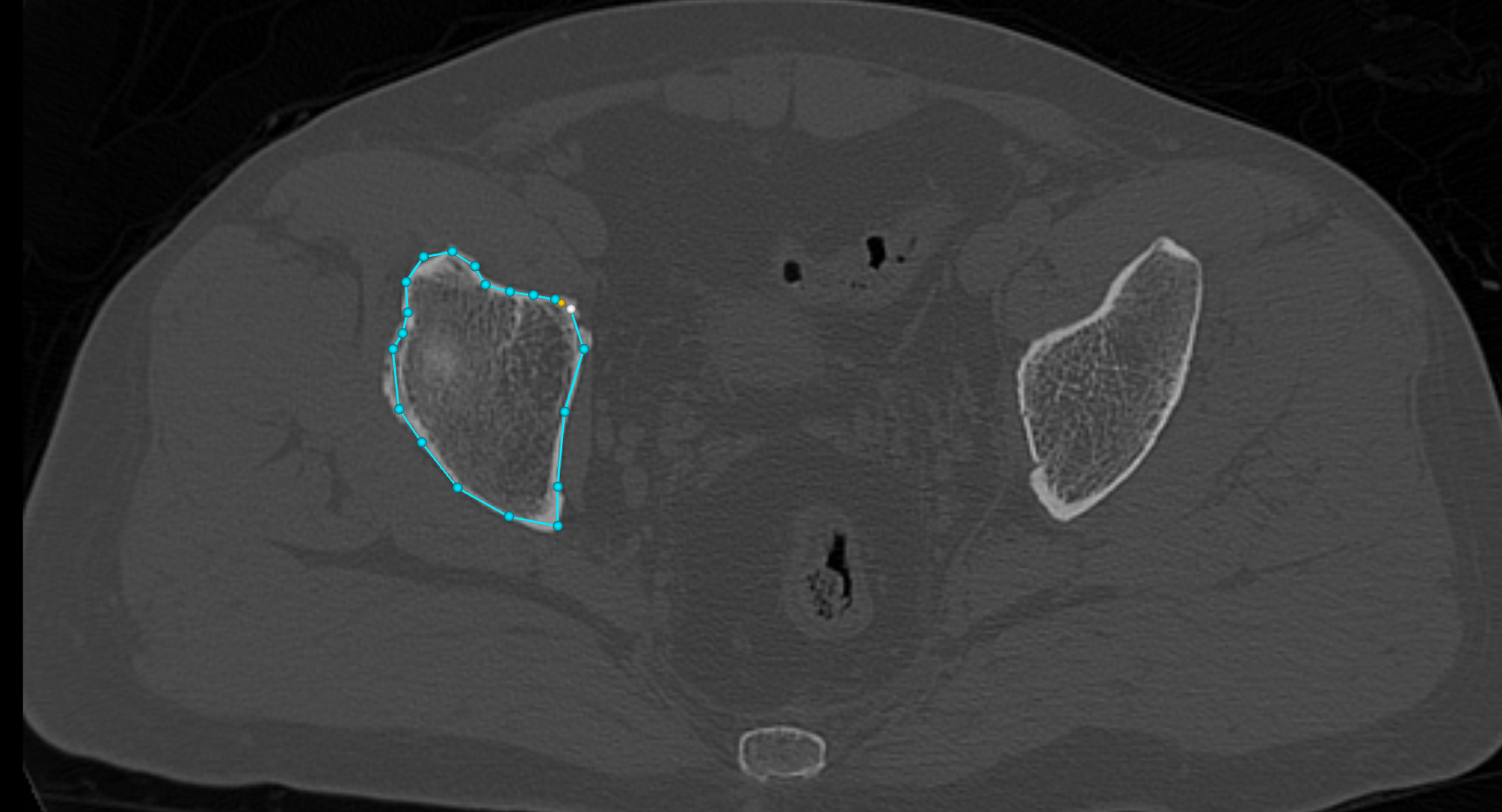
主要方法
- 订阅多边形闭合事件。
- 获取当前组件的状态。
- 获取多边形的顶点。
- 清除顶点,回到初始的绘制状态。
- 设置顶点小球的大小。
- 获得顶点小球的大小。
- 设置线宽。
- 获得线宽。
使用演示
vue
<template>
  <div class="poly-seg-example">
    <!-- 工具栏 -->
    <div class="toolbar">
      <!-- 原始图像导入 -->
      <button
        class="btn btn-image"
        :disabled="!!loading"
        @click="triggerImageInput"
      >
        {{ loading === "image" ? "加载中..." : "导入原始图像" }}
      </button>
      <input
        ref="imageInputEl"
        type="file"
        multiple
        accept=".dcm,.ima,.dicom,.mha,.mhd,.nrrd,.nii,.nii.gz"
        style="display: none"
        @change="onImageSelected"
      />

      <!-- 分割图导入 -->
      <button
        class="btn btn-seg"
        :disabled="!!loading || !imageLoaded"
        @click="triggerSegInput"
      >
        {{ loading === "seg" ? "加载中..." : "导入分割图" }}
      </button>
      <input
        ref="segInputEl"
        type="file"
        accept=".nii,.nii.gz,.mha,.mhd,.nrrd,.dcm"
        style="display: none"
        @change="onSegSelected"
      />

      <!-- 新建空白分割 -->
      <button
        class="btn btn-new-seg"
        :disabled="!!loading || !imageLoaded"
        @click="createBlankSegmentation"
      >
        新建分割
      </button>

      <template v-if="imageLoaded">
        <span class="separator">|</span>

        <!-- 切片方向 -->
        <div class="orient-group">
          <button
            v-for="ori in ORIENTATIONS"
            :key="ori.value"
            class="btn btn-orient"
            :class="{ active: currentOrientation === ori.value }"
            @click="onOrientationChange(ori.value)"
          >
            {{ ori.label }}
          </button>
        </div>

        <span class="separator">|</span>

        <!-- 切片滑块 -->
        <label class="slider-label">切片</label>
        <input
          type="range"
          class="slider"
          :min="sliceRange[0]"
          :max="sliceRange[1]"
          :step="sliceStep"
          v-model.number="slicePos"
          @input="onSliceChange"
        />
        <span class="val">{{ slicePos.toFixed(1) }}</span>

        <template v-if="segLoaded">
          <span class="separator">|</span>

          <!-- 透明度 -->
          <label class="slider-label">透明度</label>
          <input
            type="range"
            class="slider"
            min="0"
            max="1"
            step="0.05"
            v-model.number="segOpacity"
            @input="onOpacityChange"
          />
          <span class="val">{{ segOpacity.toFixed(2) }}</span>

          <button class="btn btn-toggle" @click="toggleSegVisibility">
            {{ segVisible ? "隐藏分割" : "显示分割" }}
          </button>

          <span class="separator">|</span>

          <!-- 多边形绘制开关 -->
          <button
            class="btn"
            :class="drawingActive ? 'btn-stop' : 'btn-draw'"
            @click="toggleDrawing"
          >
            {{ drawingActive ? "⬛ 停止绘制" : "✏️ 开始绘制" }}
          </button>

          <!-- 操作模式(仅绘制激活时显示) -->
          <template v-if="drawingActive">
            <div class="mode-group">
              <button
                class="btn btn-mode"
                :class="{ active: drawMode === 'erase' }"
                @click="drawMode = 'erase'"
              >
                擦除
              </button>
              <button
                class="btn btn-mode"
                :class="{ active: drawMode === 'paint' }"
                @click="drawMode = 'paint'"
              >
                涂标签
              </button>
            </div>

            <template v-if="drawMode === 'paint'">
              <label class="slider-label">标签</label>
              <input
                type="number"
                class="label-input"
                v-model.number="paintLabel"
                min="1"
                max="255"
              />
            </template>

            <span class="hint"
              >点击添加顶点 · 双击 / Enter 闭合 · 右键撤销 · Esc 重置</span
            >
          </template>

          <!-- 操作结果提示 -->
          <span v-if="lastResult" class="result-msg">{{ lastResult }}</span>
        </template>
      </template>
    </div>

    <!-- 视图区 -->
    <div class="viewport">
      <XView2D
        ref="view2D"
        viewID="vtk-poly-seg-container"
        :background="[0.0, 0.0, 0.0, 1]"
      />
    </div>
  </div>
</template>

<script lang="ts" setup>
import { ref, onMounted, onBeforeUnmount } from "vue";
import XView2D from "@/components/XView2D.vue";
import { ReadDICOM } from "@/io/readDICOM";
import { ReadNifti } from "@/io/readNifti";
import { ReadImage } from "@/io/readImage";
import { XImageActor, type MPROrientation } from "@/props/XImageActor";
import vtkImageData from "@kitware/vtk.js/Common/DataModel/ImageData";
import vtkDataArray from "@kitware/vtk.js/Common/Core/DataArray";
import {
  XSegmentationActor,
  type LabelColorMap,
} from "@/props/XSegmentationActor";
import { XDataStore } from "@/data/XDataStore";
import vtkWidgetManager from "@kitware/vtk.js/Widgets/Core/WidgetManager";
// @ts-ignore
import XPolygonSegWidget from "@/widgets/XPolygonSegWidget/index.js";
import { applyPolygonMask } from "@/utils/polygonSegUtils";

// ── 常量 ──────────────────────────────────────────────────────────────────────
const IMAGE_NAME = "poly-seg-image";
const SEG_NAME = "poly-seg-segmentation";

const ORIENTATIONS: { value: MPROrientation; label: string }[] = [
  { value: "axial", label: "轴位" },
  { value: "coronal", label: "冠状位" },
  { value: "sagittal", label: "矢状位" },
];

const AXIS_IDX: Record<MPROrientation, [number, number, number]> = {
  axial: [4, 5, 2],
  coronal: [2, 3, 1],
  sagittal: [0, 1, 0],
};

/** 各方向法向量轴(0=X 1=Y 2=Z)——与 polygonSegUtils 中保持一致 */
const NORMAL_AXIS: Record<MPROrientation, 0 | 1 | 2> = {
  axial: 2,
  coronal: 1,
  sagittal: 0,
};

/**
 * 将 manipulator 的平面原点同步到当前切片世界坐标。
 * 优先从 imageActor 的 slicePlane 读取(准确反映滚轮滚动后的 VTK 内部状态),
 * 回退到 slicePos.value(仅由滑块更新)。
 */
function updateWidgetPlane() {
  const axis = NORMAL_AXIS[currentOrientation.value];

  // 从 VTK 的 slicePlane 读取真实当前位置(包含滚轮滚动的效果)
  let worldPos = slicePos.value;
  if (imageActor) {
    const sp = imageActor.getSlicePlane?.();
    if (sp) {
      worldPos = (sp.getOrigin() as number[])[axis];
    }
  }

  const origin: [number, number, number] = [0, 0, 0];
  origin[axis] = worldPos;

  const manipulator = polygonWidget?.getManipulator?.();
  if (manipulator) {
    manipulator.setWidgetOrigin(origin);
  }
}

/**
 * 订阅 imageActor 的 slicePlane.onModified,
 * 确保鼠标滚轮滚动后 slicePos 和 manipulator 平面同步更新。
 */
function setupSlicePlaneObserver() {
  slicePlaneSubscription?.unsubscribe();
  slicePlaneSubscription = null;
  const sp = imageActor?.getSlicePlane?.();
  if (!sp) return;
  slicePlaneSubscription = sp.onModified(() => {
    const axis = NORMAL_AXIS[currentOrientation.value];
    const newPos = (sp.getOrigin() as number[])[axis];
    slicePos.value = newPos; // 同步滑块显示
    if (drawingActive.value) {
      updateWidgetPlane(); // 绘制中:保持 manipulator 跟随切片
    }
  });
}

// ── 组件状态 ──────────────────────────────────────────────────────────────────
const view2D = ref<InstanceType<typeof XView2D> | null>(null);
const imageInputEl = ref<HTMLInputElement | null>(null);
const segInputEl = ref<HTMLInputElement | null>(null);

const loading = ref<false | "image" | "seg">(false);
const imageLoaded = ref(false);
const segLoaded = ref(false);
const segVisible = ref(true);
const currentOrientation = ref<MPROrientation>("axial");

const sliceRange = ref<[number, number]>([0, 1]);
const sliceStep = ref(1);
const slicePos = ref(0);
const segOpacity = ref(0.6);

const drawingActive = ref(false);
const drawMode = ref<"erase" | "paint">("erase");
const paintLabel = ref(1);
const lastResult = ref("");

let imageActor: XImageActor | null = null;
let segActor: XSegmentationActor | null = null;
let cachedImageData: any = null;
let cachedSegData: any = null;

let widgetManager: ReturnType<typeof vtkWidgetManager.newInstance> | null =
  null;
let polygonWidget: any = null;
let activeWidget: any = null;
let activeWidgetView: any = null;
let resultTimer: ReturnType<typeof setTimeout> | null = null;
let slicePlaneSubscription: { unsubscribe: () => void } | null = null;

// ── 初始化 Widget ─────────────────────────────────────────────────────────────
onMounted(() => {
  if (!view2D.value) return;
  const renderer = view2D.value.getRenderer();

  widgetManager = vtkWidgetManager.newInstance();
  widgetManager!.setRenderer(renderer);

  // widget 实例在此创建,但 addWidget 延迟到「开始绘制」时调用,
  // 避免 representation actors 提前加入渲染器并拦截鼠标事件。
  polygonWidget = XPolygonSegWidget.newInstance({
    handleScale: 3,
    lineWidth: 2,
  });
});

onBeforeUnmount(() => {
  if (resultTimer) clearTimeout(resultTimer);
  if (drawingActive.value) stopDrawing();
  slicePlaneSubscription?.unsubscribe();
  slicePlaneSubscription = null;
  widgetManager?.delete?.();
  polygonWidget = null;
  activeWidget = null;
  activeWidgetView = null;
  widgetManager = null;
});

// ── 图像导入 ──────────────────────────────────────────────────────────────────
function triggerImageInput() {
  imageInputEl.value?.click();
}
function triggerSegInput() {
  segInputEl.value?.click();
}

async function onImageSelected(event: Event) {
  const input = event.target as HTMLInputElement;
  if (!input.files?.length) return;
  loading.value = "image";
  try {
    const files = Array.from(input.files);
    let imageData;

    if (files.length > 1 || files[0].name.toLowerCase().endsWith(".dcm")) {
      const result = await ReadDICOM.read(files);
      imageData = result.imageData;
    } else if (
      files[0].name.endsWith(".nii") ||
      files[0].name.endsWith(".nii.gz")
    ) {
      const result = await ReadNifti.read(files[0]);
      imageData = result.imageData;
    } else {
      const result = await ReadImage.read(files[0]);
      imageData = result.imageData;
    }

    XDataStore.getInstance().addImageData(IMAGE_NAME).setImageData(imageData);
    cachedImageData = imageData;

    if (imageActor) {
      slicePlaneSubscription?.unsubscribe();
      slicePlaneSubscription = null;
      view2D.value?.removeImageActor(imageActor);
      imageActor = null;
    }
    if (segActor) {
      view2D.value?.removeSegmentationActor(segActor);
      segActor = null;
      segLoaded.value = false;
      cachedSegData = null;
    }

    currentOrientation.value = "axial";
    imageActor = view2D.value?.addImage(IMAGE_NAME, "axial") ?? null;
    if (!imageActor) return;

    setupSlicePlaneObserver();

    const bounds = imageData.getBounds();
    const spacing = imageData.getSpacing();
    sliceRange.value = [bounds[4], bounds[5]];
    sliceStep.value = spacing[2] > 0 ? spacing[2] : 1;
    slicePos.value = (bounds[4] + bounds[5]) / 2;
    imageLoaded.value = true;
  } catch (e) {
    console.error("原始图像读取失败", e);
    alert("原始图像读取失败,请检查文件。");
  } finally {
    loading.value = false;
    input.value = "";
  }
}

async function onSegSelected(event: Event) {
  const input = event.target as HTMLInputElement;
  if (!input.files?.length) return;
  loading.value = "seg";
  try {
    const file = input.files[0];
    let segImageData;
    if (file.name.endsWith(".nii") || file.name.endsWith(".nii.gz")) {
      const result = await ReadNifti.read(file);
      segImageData = result.imageData;
    } else {
      const result = await ReadImage.read(file);
      segImageData = result.imageData;
    }

    XDataStore.getInstance().addImageData(SEG_NAME).setImageData(segImageData);
    cachedSegData = segImageData;

    if (segActor) {
      view2D.value?.removeSegmentationActor(segActor);
      segActor = null;
    }

    segActor =
      view2D.value?.addSegmentation(
        SEG_NAME,
        "axial",
        IMAGE_NAME,
        segOpacity.value,
        buildDemoColorMap(),
      ) ?? null;

    segLoaded.value = true;
    segVisible.value = true;
    view2D.value?.renderAtOnce();
  } catch (e) {
    console.error("分割图读取失败", e);
    alert("分割图读取失败,请检查文件格式。");
  } finally {
    loading.value = false;
    input.value = "";
  }
}

// ── 新建空白分割 ──────────────────────────────────────────────────────────────
function createBlankSegmentation() {
  if (!cachedImageData) return;
  if (drawingActive.value) stopDrawing();

  const dims = cachedImageData.getDimensions() as number[];
  const numVoxels = dims[0] * dims[1] * dims[2];

  const blankScalars = vtkDataArray.newInstance({
    name: "Scalars",
    dataType: "Uint8Array",
    numberOfComponents: 1,
    values: new Uint8Array(numVoxels),
  });

  const segImageData = vtkImageData.newInstance();
  segImageData.setOrigin(cachedImageData.getOrigin());
  segImageData.setSpacing(cachedImageData.getSpacing());
  segImageData.setDirection(cachedImageData.getDirection());
  segImageData.setDimensions(dims);
  segImageData.getPointData().setScalars(blankScalars);

  XDataStore.getInstance().addImageData(SEG_NAME).setImageData(segImageData);
  cachedSegData = segImageData;

  if (segActor) {
    view2D.value?.removeSegmentationActor(segActor);
    segActor = null;
  }

  segActor =
    view2D.value?.addSegmentation(
      SEG_NAME,
      currentOrientation.value,
      IMAGE_NAME,
      segOpacity.value,
      buildDemoColorMap(),
    ) ?? null;

  segLoaded.value = true;
  segVisible.value = true;
  view2D.value?.renderAtOnce();
}

// ── 方向切换 ──────────────────────────────────────────────────────────────────
function onOrientationChange(orientation: MPROrientation) {
  if (!cachedImageData) return;
  // 切换方向时先停止绘制
  if (drawingActive.value) stopDrawing();
  currentOrientation.value = orientation;
  view2D.value?.switchOrientation(orientation);

  const bounds = cachedImageData.getBounds() as number[];
  const spacing = cachedImageData.getSpacing() as number[];
  const [minIdx, maxIdx, spIdx] = AXIS_IDX[orientation];
  sliceRange.value = [bounds[minIdx], bounds[maxIdx]];
  sliceStep.value = spacing[spIdx] > 0 ? spacing[spIdx] : 1;
  slicePos.value = (bounds[minIdx] + bounds[maxIdx]) / 2;
  view2D.value?.setSlicePosition(slicePos.value);
  updateWidgetPlane();
}

// ── 切片控制 ──────────────────────────────────────────────────────────────────
function onSliceChange() {
  view2D.value?.setSlicePosition(slicePos.value);
  updateWidgetPlane();
}

// ── 分割图控制 ────────────────────────────────────────────────────────────────
function onOpacityChange() {
  segActor?.setOpacity(segOpacity.value);
  view2D.value?.renderAtOnce();
}
function toggleSegVisibility() {
  segVisible.value = !segVisible.value;
  segActor?.setVisibility(segVisible.value);
  view2D.value?.renderAtOnce();
}

// ── 多边形绘制 ────────────────────────────────────────────────────────────────
function toggleDrawing() {
  if (drawingActive.value) {
    stopDrawing();
  } else {
    startDrawing();
  }
}

function startDrawing() {
  if (!widgetManager) return;

  activeWidget = polygonWidget;
  if (!activeWidget) return;

  // 每次开始绘制时注册 widget(确保 representation 此时才加入渲染器)
  activeWidgetView = widgetManager.addWidget(activeWidget);
  // 将 manipulator 平面同步到当前切片位置
  updateWidgetPlane();

  activeWidgetView?.onEndInteractionEvent(() => {
    if (!cachedSegData) return;

    const pts: [number, number, number][] =
      activeWidgetView.getPolygonPoints?.() ?? activeWidget.getPolygonPoints();
    if (pts.length < 3) return;

    applyPolygonMask(
      cachedSegData,
      pts,
      currentOrientation.value,
      drawMode.value,
      paintLabel.value,
      null,
    );

    const op =
      drawMode.value === "erase" ? "擦除" : `涂标签 ${paintLabel.value}`;
    lastResult.value = `✓ 已${op}(多边形 ${pts.length} 个顶点)`;
    activeWidget.reset();

    segActor?.getMapper()?.modified?.();
    view2D.value?.renderAtOnce();
    if (resultTimer) clearTimeout(resultTimer);
    resultTimer = setTimeout(() => (lastResult.value = ""), 3000);
  });

  widgetManager.grabFocus(activeWidget);
  drawingActive.value = true;
  lastResult.value = "";
}

function stopDrawing() {
  if (!widgetManager || !activeWidget) return;
  widgetManager.releaseFocus();
  activeWidget?.reset?.();
  // 将 widget 从场景移除,actors 不再加入渲染器,不再拦截事件
  widgetManager.removeWidget(activeWidget);
  activeWidget = null;
  activeWidgetView = null;
  drawingActive.value = false;
}

// ── 演示颜色表 ────────────────────────────────────────────────────────────────
function buildDemoColorMap(): LabelColorMap {
  const map: LabelColorMap = new Map();
  map.set(0, [0, 0, 0, 0]);
  map.set(1, [255, 80, 80, 220]);
  map.set(2, [80, 255, 80, 220]);
  map.set(3, [80, 130, 255, 220]);
  map.set(4, [255, 230, 50, 220]);
  return map;
}
</script>

<style scoped>
.poly-seg-example {
  display: flex;
  flex-direction: column;
  width: 100vw;
  height: calc(100vh - 150px);
  overflow: hidden;
}

.toolbar {
  display: flex;
  align-items: center;
  gap: 8px;
  padding: 6px 12px;
  background: #1a1a1a;
  flex-shrink: 0;
  flex-wrap: wrap;
}

.btn {
  padding: 4px 14px;
  color: #fff;
  border: none;
  border-radius: 4px;
  cursor: pointer;
  font-size: 13px;
}
.btn:disabled {
  opacity: 0.5;
  cursor: not-allowed;
}
.btn-image {
  background: #2a6e3f;
}
.btn-image:hover:not(:disabled) {
  background: #3a8e4f;
}
.btn-seg {
  background: #1a4f8a;
}
.btn-seg:hover:not(:disabled) {
  background: #2a6faa;
}
.btn-new-seg {
  background: #4a2a7a;
}
.btn-new-seg:hover:not(:disabled) {
  background: #6a4a9a;
}
.btn-toggle {
  background: #555;
}
.btn-toggle:hover {
  background: #777;
}
.btn-draw {
  background: #7a4a1a;
}
.btn-draw:hover {
  background: #9a6a3a;
}
.btn-stop {
  background: #7a1a1a;
}
.btn-stop:hover {
  background: #9a3a3a;
}

.orient-group,
.mode-group {
  display: flex;
  gap: 4px;
}
.btn-orient,
.btn-mode {
  background: #444;
}
.btn-orient:hover:not(:disabled),
.btn-mode:hover:not(:disabled) {
  background: #666;
}
.btn-orient.active,
.btn-mode.active {
  background: #2a7a4e;
}

.separator {
  color: #666;
  padding: 0 2px;
}
.slider-label {
  color: #ccc;
  font-size: 12px;
  white-space: nowrap;
}
.slider {
  width: 120px;
  accent-color: #42b883;
}
.val {
  color: #aaa;
  font-size: 12px;
  min-width: 40px;
}
.label-input {
  width: 56px;
  background: #333;
  color: #fff;
  border: 1px solid #555;
  border-radius: 4px;
  padding: 2px 6px;
  font-size: 13px;
}
.hint {
  color: #42b883;
  font-size: 12px;
}
.result-msg {
  color: #f0c040;
  font-size: 12px;
}

.viewport {
  flex: 1;
  overflow: hidden;
  position: relative;
}
</style>